> ## Documentation Index
> Fetch the complete documentation index at: https://adadvisor.ai/docs/llms.txt
> Use this file to discover all available pages before exploring further.
# Understanding Your Campaign Plan
> Learn how to read the AI-generated campaign plan, including strategy, targeting, and budget recommendations.
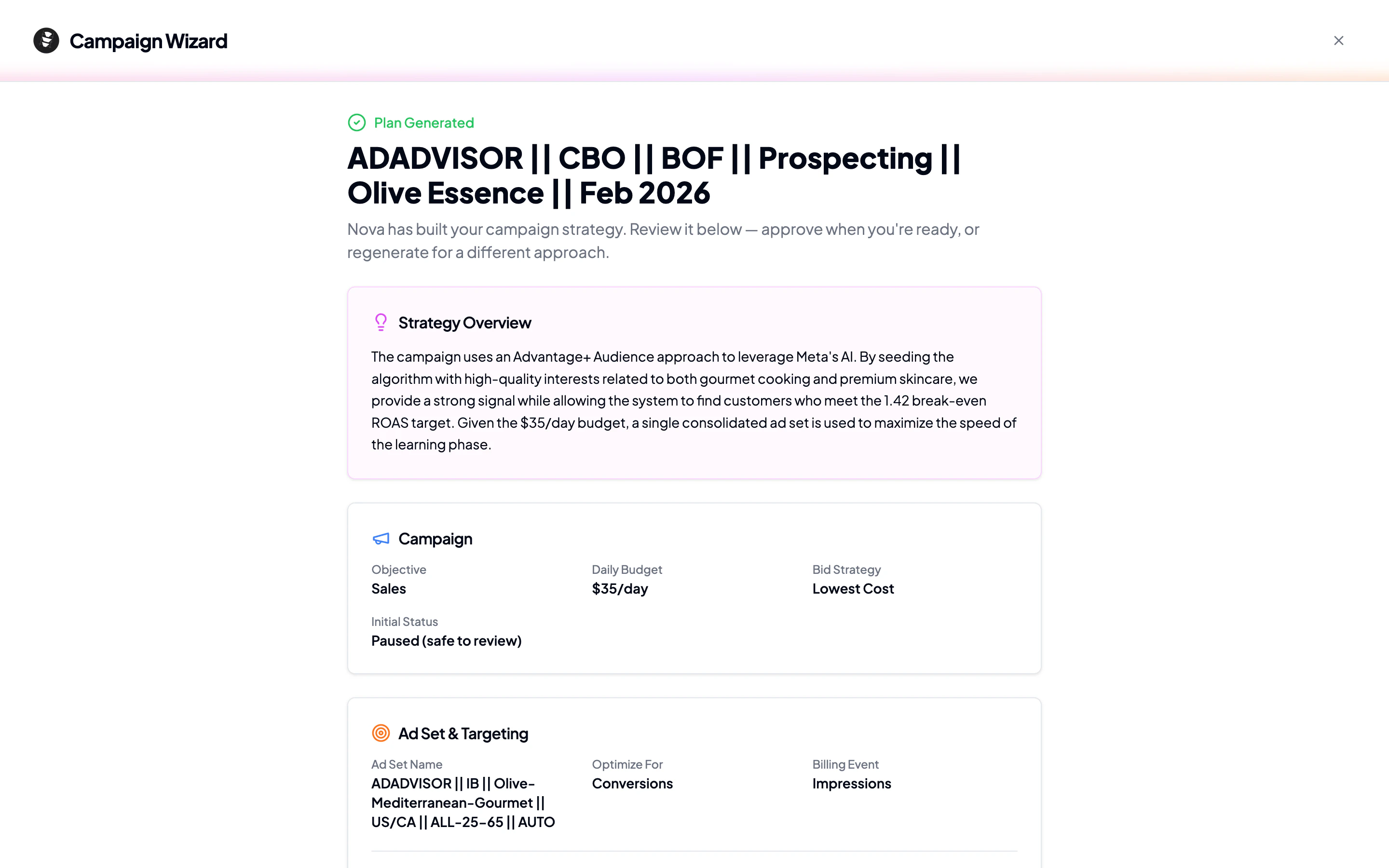
After the Campaign Wizard finishes generating, you'll see a results page with your complete campaign plan. Here's what each section means and what to look for.
 ## Strategy overview
At the top, you'll see a card explaining the AI's overall approach. This is a plain-language summary of why the AI chose this particular campaign structure, targeting strategy, and budget allocation. Read this first to understand the big picture.
## Campaign settings
This card shows the technical configuration for your campaign:
| Setting | What it means |
| ------------------ | --------------------------------------------------------------- |
| **Objective** | What Meta will optimize for (e.g., Sales, Leads) |
| **Daily Budget** | How much you'll spend per day |
| **Bid Strategy** | How Meta will bid in auctions (e.g., Lowest Cost) |
| **Initial Status** | Always starts as **Paused** so you can review before going live |
Your campaign always starts paused. Nothing runs on Meta until you explicitly activate it.
## Ad set and targeting
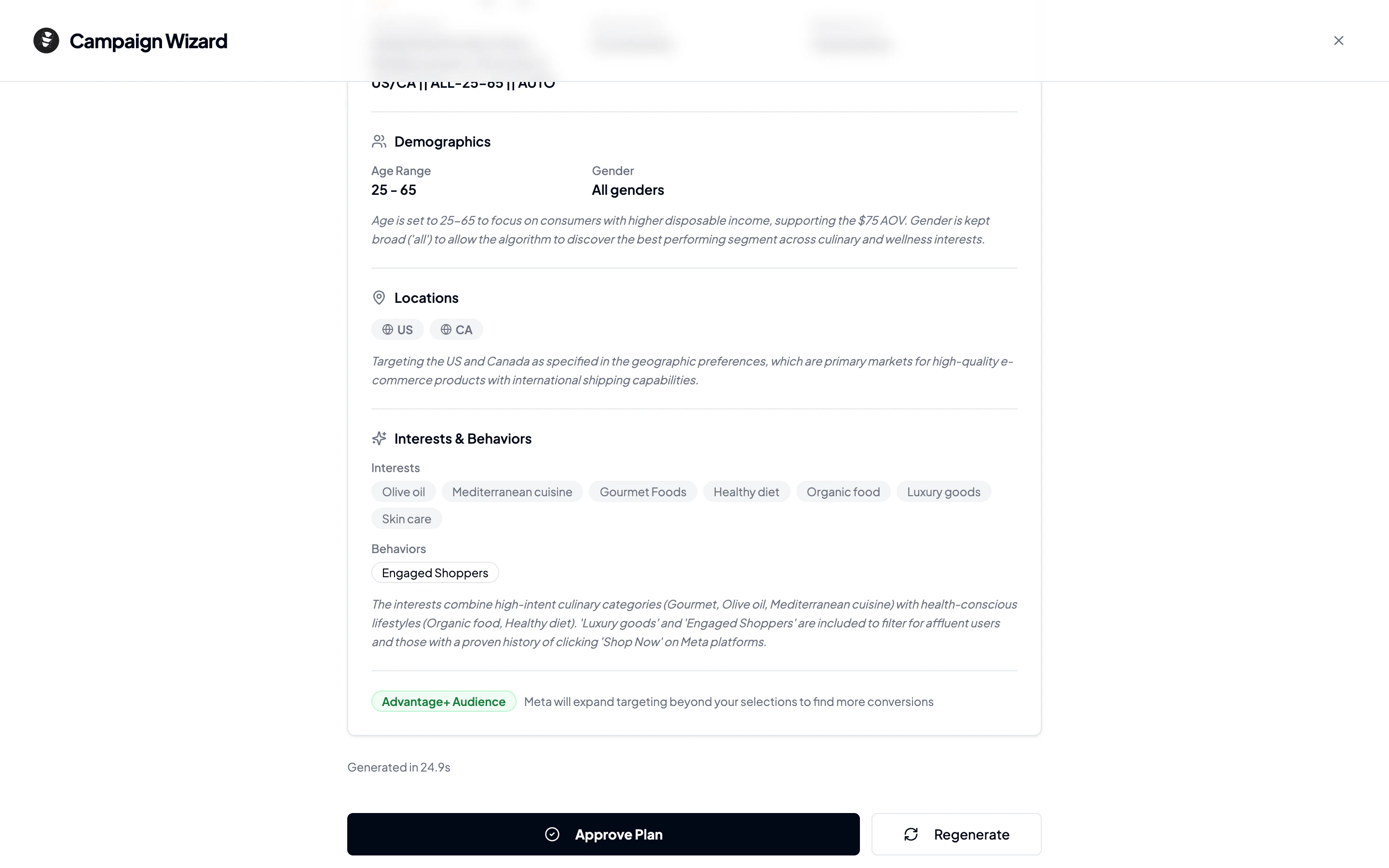
This is the most detailed section. It breaks down who will see your ads:
### Demographics
* **Age range**: The minimum and maximum ages targeted
* **Gender**: All genders, or a specific selection
* **Estimated audience size**: How many people fall into this targeting bracket
### Geographic targeting
* **Countries**: The primary countries selected
* **Cities**: Specific cities with radius targeting (if applicable)
* **Regions**: States or provinces (if applicable)
### Interests and behaviors
The AI researches Meta's interest taxonomy and selects targeting dimensions relevant to your business. These are displayed as badges grouped by category:
* **Interests**: Topics and pages people engage with
* **Behaviors**: Purchase behavior, device usage, travel habits
* **Income levels**: Household income brackets (where available)
* **Life events**: Recently moved, new job, etc.
* **Industries and job titles**: Professional targeting
### Advantage+ Audience
If enabled, this lets Meta's algorithm expand beyond your selected targeting when it finds likely converters. The AI enables this when it thinks the algorithm will help.
## What you can do from here
At the bottom of the results page, you'll see action buttons depending on the plan's current status:
| Plan status | Available actions |
| ------------ | ------------------------------------------ |
| **Draft** | **Approve Plan** |
| **Approved** | **Create Campaign on Meta** |
| **Deployed** | **Activate Campaign** (resume from paused) |
| **Live** | View only (campaign is running) |
## Next step
Happy with the plan? Head to [Deploying Your Campaign](/user-guide/deploying-your-campaign) to push it live on Meta.
## Strategy overview
At the top, you'll see a card explaining the AI's overall approach. This is a plain-language summary of why the AI chose this particular campaign structure, targeting strategy, and budget allocation. Read this first to understand the big picture.
## Campaign settings
This card shows the technical configuration for your campaign:
| Setting | What it means |
| ------------------ | --------------------------------------------------------------- |
| **Objective** | What Meta will optimize for (e.g., Sales, Leads) |
| **Daily Budget** | How much you'll spend per day |
| **Bid Strategy** | How Meta will bid in auctions (e.g., Lowest Cost) |
| **Initial Status** | Always starts as **Paused** so you can review before going live |
Your campaign always starts paused. Nothing runs on Meta until you explicitly activate it.
## Ad set and targeting
This is the most detailed section. It breaks down who will see your ads:
### Demographics
* **Age range**: The minimum and maximum ages targeted
* **Gender**: All genders, or a specific selection
* **Estimated audience size**: How many people fall into this targeting bracket
### Geographic targeting
* **Countries**: The primary countries selected
* **Cities**: Specific cities with radius targeting (if applicable)
* **Regions**: States or provinces (if applicable)
### Interests and behaviors
The AI researches Meta's interest taxonomy and selects targeting dimensions relevant to your business. These are displayed as badges grouped by category:
* **Interests**: Topics and pages people engage with
* **Behaviors**: Purchase behavior, device usage, travel habits
* **Income levels**: Household income brackets (where available)
* **Life events**: Recently moved, new job, etc.
* **Industries and job titles**: Professional targeting
### Advantage+ Audience
If enabled, this lets Meta's algorithm expand beyond your selected targeting when it finds likely converters. The AI enables this when it thinks the algorithm will help.
## What you can do from here
At the bottom of the results page, you'll see action buttons depending on the plan's current status:
| Plan status | Available actions |
| ------------ | ------------------------------------------ |
| **Draft** | **Approve Plan** |
| **Approved** | **Create Campaign on Meta** |
| **Deployed** | **Activate Campaign** (resume from paused) |
| **Live** | View only (campaign is running) |
## Next step
Happy with the plan? Head to [Deploying Your Campaign](/user-guide/deploying-your-campaign) to push it live on Meta.