


TL;DR
To force Meta to advertise all products from a large catalog, segment the catalog into product sets, run collection or SKU-level campaigns alongside Advantage+, use inclusion sets to push the long tail into rotation, cap your proven winners so they stop absorbing budget, and rotate spend toward underexposed products. Advantage+ concentrates spend on early-winning SKUs by design, so broader coverage has to be structured, not requested.
The Levers, in Order
Here is the short version of the fix. Each lever is expanded below.
- Segment the catalog into product sets by margin, category, or performance, so the long tail stops competing with your heroes for the same budget.
- Run dedicated campaigns for underexposed sets alongside your main Advantage+ catalog campaign.
- Use inclusion sets to force specific SKUs into delivery instead of leaving selection to the algorithm.
- Cap or separate proven winners so a handful of products cannot absorb the entire budget.
- Rotate budget toward products at their ROAS peak and pull it from saturated ones.
- Consider SKU-level automation once manual rotation stops scaling.
This article is for ecommerce advertisers and agencies running catalogs of several hundred to several thousand SKUs whose Advantage+ campaigns over-concentrate spend. It assumes you already run catalog or dynamic product ads. If you have not built the catalog yet, set up your Meta product catalog and come back.

Drowning in Meta Ads?
Put your campaign on autopilot with Nova.
Read moreWhy Meta Only Advertises a Few of Your Products
Meta concentrates spend on a small set of SKUs because its delivery system optimizes for the cheapest conversions it can find right now, not for catalog coverage. Call it the Proven-Winner Loop: a product gets an early conversion, the algorithm reads that as a signal, it sends more impressions to that product, the product converts again, and the loop tightens around a few dozen SKUs while the long tail never gets enough impressions to prove itself.
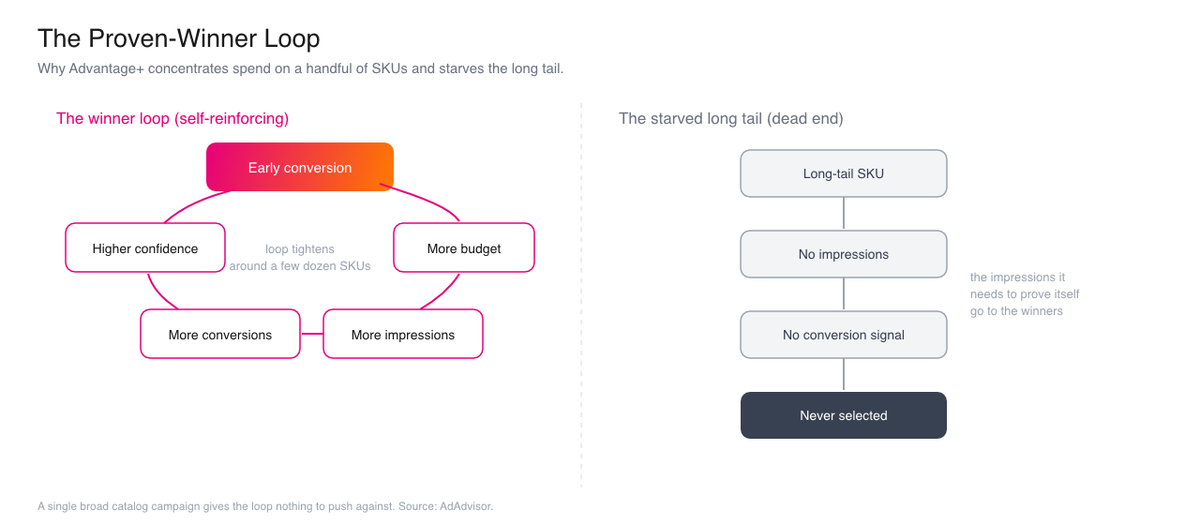
The scale of this is easy to underestimate. On a catalog of a couple of thousand SKUs, it is common to see the bulk of spend land on only a few dozen product IDs, often somewhere in the 20 to 40 range, while hundreds of other SKUs receive little or no delivery. These are patterns advertisers report rather than fixed thresholds Meta publishes, and the exact split varies by budget, account, and structure. The shape, though, is consistent: a short head that absorbs the budget and a long tail that never gets a fair test.
With a single broad Advantage+ catalog campaign, every product competes for the same budget in the same auction. The algorithm has no incentive to spend on an untested SKU when a proven one is likely to return a conversion at a lower cost. From Meta's side this is rational. Its objective is conversion efficiency for the campaign, and starving the long tail is the efficient move.
For a catalog business it is the wrong outcome. Your unexposed SKUs may carry higher margins, clear aging inventory, or convert well once they get a fair test. They generally never get that test inside one broad campaign, because the impressions needed to generate a first conversion signal are the exact impressions the algorithm is routing elsewhere. This is the mechanism most guides skip: the problem is not that Meta dislikes your other products, it is that a single-campaign structure gives the Proven-Winner Loop nothing to push against.
How to Force Meta to Advertise Your Whole Catalog
Before changing anything, work out which version of the problem you have. The fix depends on it.
Diagnose the coverage problem before you fix it
| Symptom | Likely cause | First fix |
|---|---|---|
| Only 20 to 40 SKUs get any spend | The Proven-Winner Loop | Separate hero products into a capped campaign |
| New products never show at all | No protected budget for the long tail | Dedicated campaigns built on product sets |
| Long tail gets impressions but no conversions | Feed or creative issue, not delivery | Improve merchandising before restructuring |
| Coverage shifts too slowly to matter | Manual process cannot keep up | A budget rotation workflow or automation |
Forcing coverage means changing the structure so the long tail has protected budget and a level test. Work through these steps in order.
How to force broader catalog coverage
Segment the catalog into product sets
In Commerce Manager, open your catalog and create product sets using filter rules such as price range, custom label, product type, or availability. Group by what matters to your business: margin band, category, or current exposure. Product sets work because they stop fundamentally different products from competing for the same budget in the same auction, so a low-priced impulse buy is no longer bidding against a high-margin flagship. They are the unit of control that everything below depends on.
Run dedicated campaigns for underexposed sets
Build a separate Advantage+ catalog campaign or ad set for the product sets that never get spend, and run it alongside your main campaign. This gives the long tail its own budget that proven winners cannot raid.
Use inclusion sets to force specific SKUs into delivery
Point a campaign at a product set built only from the SKUs you want to surface. Because the algorithm can only choose from products inside the set, this is the most direct way to force coverage of a defined group.
Cap or separate your proven winners
Move your top converting SKUs into their own campaign and give it a fixed budget. Once winners live in a contained campaign, they can no longer absorb the budget meant for discovery.
Monitor product-level delivery, not just campaign results
Check spend and impressions per product ID in your reporting. If a set you meant to expose is still flat, tighten it further or raise its dedicated budget. Coverage that looks fixed at the campaign level is often still concentrated underneath.
Give the changes time before you judge them. Splitting winners into their own campaign and standing up new campaigns for the long tail pushes those new campaigns back into Meta's learning phase, where delivery is unstable while the algorithm gathers signal. Generally allow 5 to 7 days of stable delivery before deciding whether coverage has actually broadened. Reading results on day two usually means reacting to noise.
Use a negative product set
Create a negative product set for items you would rather not spend on: clearance or overstock lines you are already discounting, low-margin products where paid traffic rarely pays for itself, and high-return or end-of-life items. Excluding those SKUs stops them from quietly draining budget. Keep the set under review, since stock levels and margins change and a SKU worth excluding this month may be worth promoting next month.
Rotating Budget Across Catalog Products
Budget rotation means moving spend toward products near their ROAS peak and pulling it from products that have saturated. A product tends to deliver its strongest return in a window before frequency climbs and returns taper. The goal is to catch that window across the catalog rather than leaving budget parked on yesterday's winners.
Manually, this is a weekly cadence. Review product-level delivery, shift budget from sets whose ROAS is likely declining toward sets that are climbing or still untested, and repeat. For a few hundred SKUs across a handful of product sets, a disciplined weekly pass is generally workable.
The method matters more than the tooling at small scale. Define the product sets, set a review rhythm, and move budget on evidence rather than on the last product that happened to convert. What breaks this approach is volume, which is the next section.
When SKU-Level Automation Tools Make Sense
At large SKU counts, manual rotation stops scaling. Once you are tracking product-level ROAS peaks across thousands of SKUs and dozens of product sets, a weekly human pass cannot keep up with how fast delivery shifts, and this is where tools with SKU-level intelligence earn their place.
The honest comparison is below.
Manual, native, and third-party approaches to catalog coverage
| Approach | Best fit | Trade-off |
|---|---|---|
| Manual product sets and rotation | Up to a few hundred SKUs, a few product sets | Free and precise, but time-heavy and slow to react |
| Native Advantage+ Product Set Optimization | Mid to large catalogs wanting SKU-level budget control inside Meta | Built in, but still needs you to define and maintain the sets |
| SKU-level automation tools | Thousands of SKUs, many sets, fast-shifting delivery | Adds cost, but monitors product-level performance and rotates spend continuously |
If you want automation that watches product-level performance and paces budget across the catalog without a manual weekly pass, AdAdvisor is one option worth a look. Its team pairs more than seven years in performance marketing and over $60M in managed ad spend with an ex-Meta data engineer who has built and shipped AI products, and its Nova layer is designed to monitor accounts continuously and handle budget pacing, which is generally the part manual rotation struggles with at scale. Solve the coverage problem with the native levers first; a tool is an accelerant, not a substitute for the structure.

Industry News
Madgicx vs BigAtom: SKU-level catalog automation tools compared
A side-by-side look at two catalog ad automation tools, to help you choose the right SKU-level option.
Read moreFrequently Asked Questions
Frequently Asked Questions
In Short
Advantage+ concentrates spend on early-winning SKUs through the Proven-Winner Loop, and a single broad campaign gives that loop nothing to push against. To force broader coverage, segment the catalog into product sets, run dedicated campaigns with inclusion sets, cap your winners, and rotate budget on evidence. For the wider system this sits inside, see the catalog ad automation guide, and if you are starting from zero, set up your Meta product catalog first.
Sources
- About Meta Advantage+ Catalog Ads, Meta for Business Help Center
- Meta Advantage+ Catalog Ads, Meta for Business
- The Complete Meta Advantage+ Catalog Ads Guide for 2026, Marpipe
- Meta Advantage+ Product Set Optimization: 2026 Feed Strategy, aishoppingfeeds
- Meta Advantage+ Shopping Campaigns in 2026, Common Thread Collective
- Why your catalog ad campaigns keep pushing the same few products, Surebright



